
10 min read

Reviewing 3D Packaging Assets: Where Standard Markup Fails

Reviewing 3D Packaging Assets: Where Standard Markup Fails

Picture this. Your design team has spent weeks getting a new product launch right. The 3D render looks excellent in isolation - the colors are strong, the logo sits well, and the structural dieline looks correct. You share it out for review and the feedback comes back as a collection of annotated screenshots, voice notes, emails with vague direction, and one comment thread that references a version nobody can locate.

That's not a people problem. It's a tooling problem.

As packaging design increasingly moves into three dimensions - rotating mockups, rendered packshots, interactive dieline previews - the gap between what reviewers need to do and what standard markup tools allow them to do has grown significantly. Most annotation platforms were built for flat files. PDFs. Images. Static pages. They do that job well. But hand them a rotating 3D packaging asset and the cracks start to show almost immediately.

This article looks at exactly where those cracks appear, why they matter for teams producing packaging at scale, and what a purpose-built approach to 3D review actually looks like.

What Is 3D Packaging Review?

Three-dimensional packaging review is the process of inspecting, annotating, and approving packaging design assets rendered in a 3D or rotational format - including interactive packshots, structural dieline visualizations, and rotating render files - within a controlled review workflow.

Unlike reviewing a flat PDF proof, 3D review requires the ability to inspect a design from multiple angles simultaneously, anchor feedback to a specific surface or position on the asset as it moves, and connect those annotations to the broader approval and version control workflow. Without that, reviewers are left exporting screenshots and hoping their written descriptions are clear enough.

Key Takeaways

  • Standard markup tools were designed for flat, static files - they do not translate well to 3D review.
  • Feedback on rotating assets quickly becomes ambiguous when reviewers cannot pin comments to a specific surface or viewing angle.
  • Screenshot workarounds introduce version confusion and audit trail gaps.
  • Purpose-built packaging review platforms allow annotation directly on 3D renders as the asset rotates.
  • Connecting 3D review to workflow automation and version control is what separates a useful tool from a genuine production solution.
  • Teams managing high volumes of SKUs or regional packaging variants face the greatest exposure to 3D review problems.

Why 3D Packaging Review Has Become the Norm

A decade ago, most packaging teams reviewed flat artwork files and relied on physical prototypes for a sense of how the final product would look. That process was slow and expensive, but it worked - everyone knew what they were looking at.

The shift toward 3D visualization has changed that dynamic considerably. Brands now expect to review photorealistic 3D renders and rotating packshots as a standard part of the artwork approval process. This speeds things up in many ways - you can evaluate shelf presence, label placement, and structural concerns without waiting for a physical sample. E-commerce teams also increasingly depend on 3D renders for product imagery, so those assets need to clear the review process accurately before they go anywhere.

But the review tools most teams reach for haven't kept pace. The instinct is to use what's already in place - the proofing platform that handles PDFs, the annotation tool that works well for flat artwork, the shared drive with a comment thread attached. These work well for what they were built for. Three-dimensional, rotating assets are something else entirely.

2


Where Standard Markup Tools Fall Short With 3D Assets

Comments that lose their position

The fundamental problem with applying flat annotation tools to 3D assets is that comments cannot stay anchored to the right place. When a reviewer draws a circle on a 2D screenshot and writes "fix the font here," that annotation lives on a frozen frame. If the 3D asset is then updated - the geometry adjusted, the finish changed, the file re-rendered - the annotation no longer corresponds to anything meaningful. The circle is in the same pixel position on screen, but the packaging has changed around it.

With flat PDFs, this is manageable because coordinates on a page stay consistent across versions. With a rotating 3D asset, a comment on "the back panel" is only meaningful if you know exactly what angle the reviewer was looking at when they made it. Without that context, the designer has to guess.

The screenshot workaround creates its own problems

The most common workaround is to export screenshots at specific angles and annotate those instead. This is understandable - it uses familiar tools and feels like a reasonable compromise. But it introduces a version control problem immediately. Which render did this screenshot come from? Was the file it was exported from the approved working version? If the 3D asset has since been updated, is this annotation still valid?

Multiply that across a team of ten reviewers, each working on their own set of screenshots, and the feedback consolidation challenge becomes significant. Someone has to reconcile all of that, check for contradictions, match annotations back to the current file, and make sure nothing has been missed. For teams managing dozens of active SKUs at once, that overhead adds up quickly.

Audit trail gaps

Approval workflows for packaging often have real compliance requirements attached. There are regulatory elements that need sign-off, brand governance processes that require documented approval, and for pharmaceutical or food packaging, legal obligations around what appears on the finished product.

When the review process spills across flat annotation tools, emailed screenshots, and comment threads in shared files, the audit trail becomes fragmented. You can piece together what was approved and when, but you cannot point to a single controlled record. That is a problem when a question arises after launch - or worse, when something has gone to print that should not have.

Reviewer experience drives quality of feedback

There is a practical consideration here that often gets overlooked. When reviewers find a tool difficult or limiting, the quality of their feedback tends to suffer. A brand manager who cannot easily navigate a 3D render in their browser will fall back on vague comments - "the logo doesn't look right" or "can we check the back panel?" - because they cannot point to exactly what they mean.

Precision in feedback directly reduces revision cycles. Tools that make it easy for non-technical reviewers to leave specific, locatable feedback on a 3D asset tend to produce better first-pass accuracy. The more awkward the review process, the more rounds it takes to get to an approved file.

What a Purpose-Built Approach to 3D Packaging Review Looks Like

The distinction between a general-purpose annotation tool and a platform designed for packaging review starts to matter most when 3D assets are involved. Here is what a well-designed 3D review workflow provides that standard markup tools do not.

Annotation directly on the rotating asset

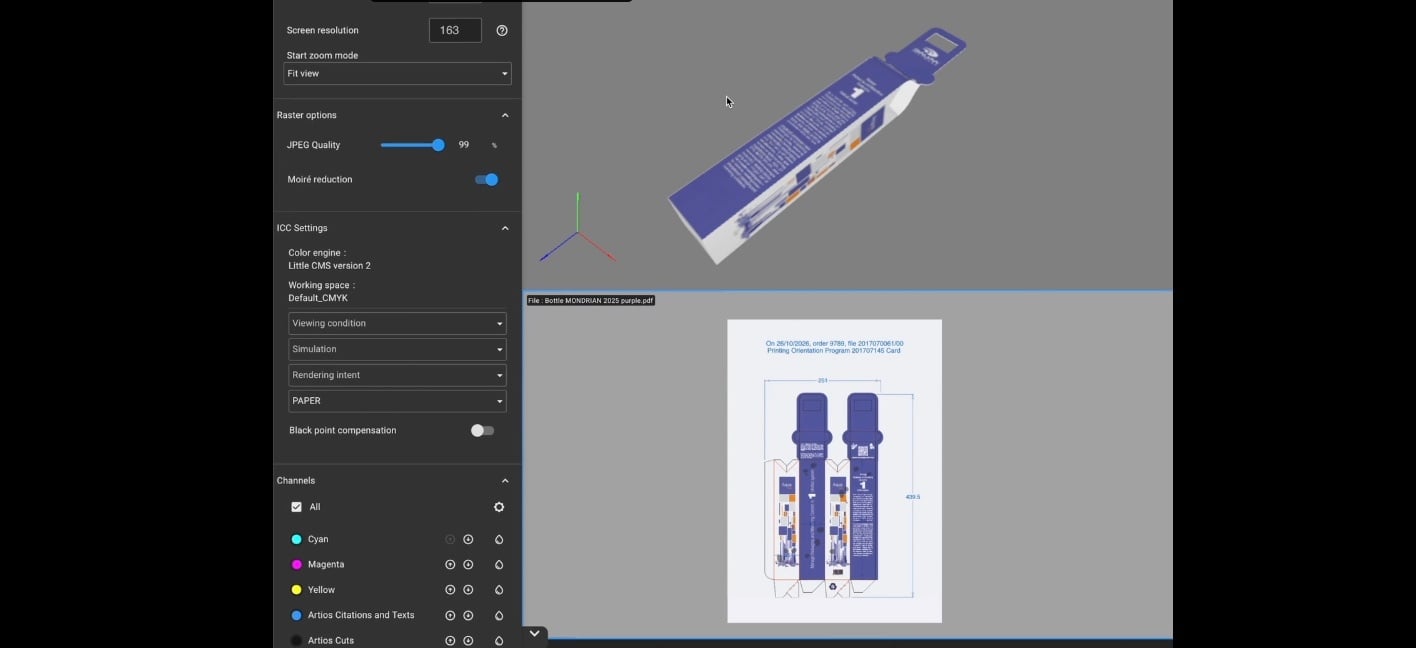
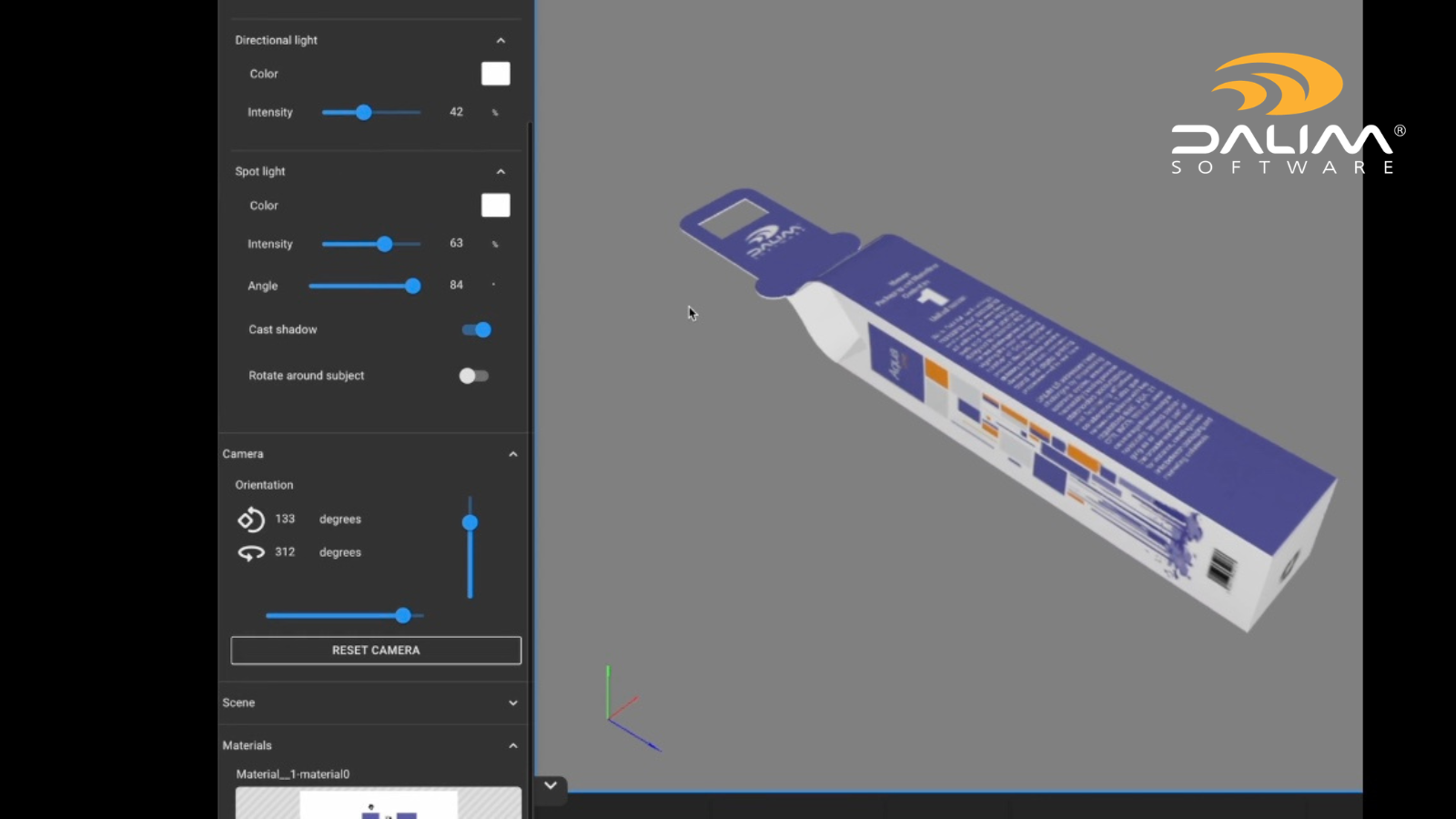
Rather than requiring reviewers to freeze a frame and annotate a screenshot, purpose-built online proofing tools allow comments to be placed directly on the 3D surface as it rotates. When another reviewer opens that comment, the asset repositions to the exact angle at which the feedback was made. The comment travels with the geometry, not with a pixel coordinate on a frozen image.

This sounds like a small difference. In practice, it eliminates the most common source of confusion in 3D packaging review - the question of "where exactly did they mean?" - and makes it possible to leave precise, surface-specific feedback on a pack that a reviewer may only ever interact with through a browser.

Layer and surface context

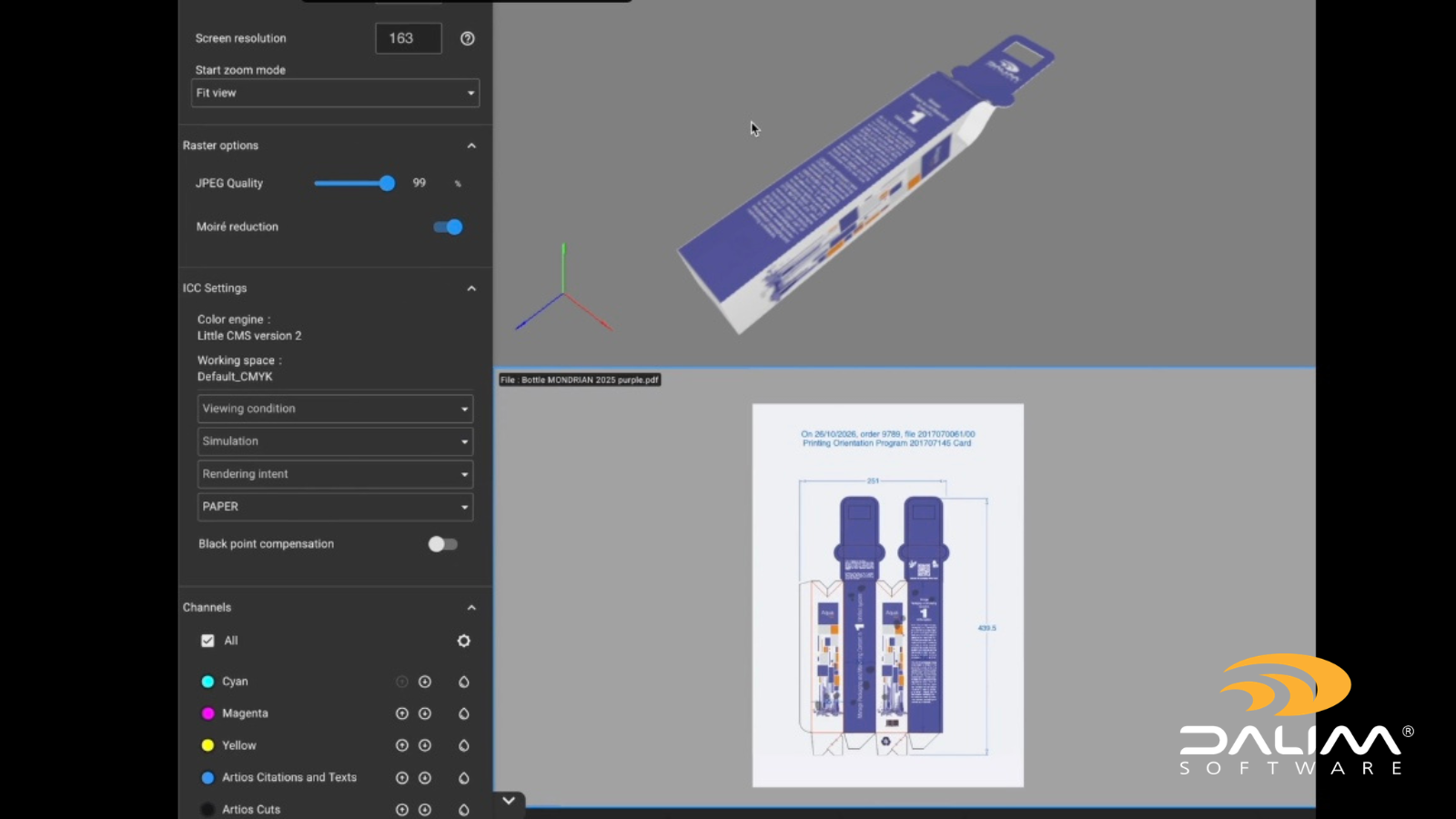
Packaging files often contain multiple layers - print surface, varnish zones, foil, dieline, substrate color - that need to be reviewed independently. A good 3D review environment lets reviewers toggle between those layers in context, checking that a varnish zone aligns correctly with the printed element beneath it, or that a foil finish sits within spec when viewed against the dieline. Flat tools cannot show this relationship in a way that reflects how the finished pack will actually look.

Linked to version control and approval routing

Annotation on its own is not enough. For 3D review to function well within a packaging production process, comments and approvals need to connect to a version-controlled digital asset management environment and a structured workflow. When a new version of the 3D file is uploaded, outstanding annotations should carry forward or be flagged for re-review. When approval is given, there should be a timestamped record attached to that exact version of the file.

This is what separates a review feature from a production solution. The annotation capability needs to sit inside a wider workflow that handles routing, escalation, version management, and the audit trail.

A Practical Framework for 3D Packaging Review

  1. Centralise the 3D asset in a controlled environment. Before review begins, ensure the 3D file is uploaded to a single platform with version control enabled. Reviewers should access the asset from there, not from a shared drive, email attachment, or separate viewer tool.
  2. Define who reviews which surface or layer. Different stakeholders have different review responsibilities. Brand teams focus on logo placement and color accuracy. Regulatory reviewers check mandatory copy. Production teams validate dieline and structural integrity. Assigning surface-specific review responsibilities reduces duplication and clarifies accountability.
  3. Annotate directly on the rotating asset. Instruct reviewers to leave comments on the 3D file itself, pinned to specific surfaces and viewing angles. Discourage screenshot-based feedback where the platform supports direct annotation. If a reviewer genuinely cannot use the 3D interface, ask them to describe their comment with a reference angle rather than exporting a frame.
  4. Link comments to the relevant artwork version. Every comment should be attached to a specific version of the file. When a revision is uploaded, those comments should either be resolved or carried forward with a clear status. This prevents old feedback from being mistaken for current instructions.
  5. Use comparison tools to verify changes. When a revised 3D render is uploaded, use side-by-side or overlay comparison tools to confirm that the requested changes have been made and that nothing else has shifted. This is particularly important for structural changes that might affect adjacent panels.
  6. Close the approval loop with a documented sign-off. Final approval should be logged against the specific version of the 3D asset within the platform, with a timestamped record of who approved and when. This forms the basis of the audit trail needed for compliance purposes.

Traditional vs Purpose-Built: A Comparison


Standard Markup Tool Purpose-Built 3D Review Platform
Annotations pinned to pixel coordinates on a frozen frame Annotations anchored to 3D surface geometry, reposition to correct angle on recall
Requires screenshot exports to share specific views Reviewers comment directly on the rotating asset in-browser
Version control managed separately or not at all Annotations linked to specific file versions within a controlled workflow
Audit trail fragmented across email and shared files Full timestamped record of all review activity and approvals
Layer inspection requires separate tools or exports Toggle between print, varnish, dieline, and substrate layers in context
Non-technical reviewers struggle with 3D navigation Interface designed for non-designers; no specialist training required


1


Scale, Variants, and Why This Gets Harder at Volume

For teams managing a handful of SKUs, the problems described above are manageable - inconvenient, but not critical. The real pressure builds when you are handling dozens or hundreds of packaging variants, regional artwork differences, language versions, and reformulation cycles at the same time.

Each 3D asset in that context has its own review cycle, its own set of stakeholders, and its own version history. If the review tooling cannot handle that volume in a consistent, structured way, teams end up managing the process manually - tracking which version of which asset has been reviewed by whom, chasing outstanding approvals, and reconciling feedback from multiple channels.

That manual overhead is where errors tend to hide. A comment that wasn't actioned because it was on the wrong version. An approval that was given on a render that didn't reflect the most recent structural change. A regional variant that went to print before the local regulatory review had been completed. These are the situations that purpose-built packaging review workflows are designed to prevent.

DALIM FUSION is built for exactly this kind of environment. It supports annotation directly on 3D and rotational packaging assets within a broader platform that covers version-controlled digital asset management, structured approval workflows, preflight and validation, and full audit trails. Rather than handling 3D review in isolation, it connects that review activity to the rest of the production process - so approval on a 3D render is part of the same controlled workflow as the prepress check, the barcode validation, and the final sign-off before files go to print.

Frequently Asked Questions

Q: Why can't standard proofing tools handle 3D packaging review? A: Standard proofing tools are built around flat, static files. They anchor annotations to pixel coordinates on a fixed image. When a 3D asset rotates or is updated, those annotations lose their positional context. Purpose-built 3D review platforms pin comments to surface geometry, so they stay meaningful as the asset moves and evolves across versions.

Q: What file formats are typically used for 3D packaging review? A: Common formats include GLB, GLTF, OBJ, and proprietary packaging formats from structural design tools. Some platforms also generate interactive 3D previews directly from PDF dielines and flat artwork, allowing reviewers to see how a design wraps a structure without needing a separately created 3D model.

Q: How do you handle feedback from stakeholders who are not comfortable with 3D tools? A: Good 3D review platforms are designed to be accessible without specialist training - a brand manager or regulatory reviewer should be able to navigate a rotating pack in a browser and leave a comment without needing to understand 3D software. The key is an interface built for non-technical users. If reviewers are still struggling, the platform choice may be the issue.

Q: How do you maintain an audit trail for 3D packaging approvals? A: A proper audit trail for 3D review requires that all annotations, approval decisions, and version changes are logged within a single controlled environment. Each comment and sign-off should be timestamped and attached to a specific version of the file. When review activity is spread across external tools, email, and screenshots, that trail becomes very difficult to reconstruct reliably.

Q: What is the difference between a 3D render and a 3D review? A: A 3D render is the visual output - a photorealistic image or interactive model of a packaging design. A 3D review is the structured process of evaluating that render with stakeholders, leaving annotated feedback, managing versions, and routing the asset through an approval workflow. Rendering tools produce the asset; review platforms govern how it is evaluated and approved.

Q: Does reviewing packaging in 3D reduce the need for physical samples? A: For many aspects of design review, yes. Accurate 3D renders can reveal label placement issues, finish misalignments, and structural concerns that would previously require a physical prototype. However, 3D review supplements physical proofing rather than replacing it entirely - particularly for material feel, print quality, and final structural integrity checks ahead of high-volume production runs.

Q: How should version control work for 3D packaging assets? A: Each new version of a 3D packaging file should be uploaded to a controlled environment that logs the change, carries forward or flags outstanding annotations, and requires the relevant stakeholders to re-review any elements that have changed. Approvals should be tied to specific versions, not to the asset in general, so there is no ambiguity about what exactly was signed off.

Q: At what stage of the packaging artwork process should 3D review happen? A: 3D review typically sits alongside or after the flat artwork approval stage, once the design is far enough developed to render accurately in three dimensions. For structural packaging, a 3D review at dieline stage can catch alignment issues before they become print corrections. For brand or e-commerce packaging, 3D review is often the final visual check before files go to prepress.

Conclusion

3D packaging review is not a niche requirement. For any team producing consumer packaging at reasonable volume, rotating renders and interactive packshots are now a standard part of the design and approval process. The tools that support that process need to reflect that reality.

Standard markup and annotation platforms are not the right fit for this job - not because they are poor tools, but because they were built for a different format. Applying them to 3D review creates predictable problems: imprecise feedback, version confusion, audit trail gaps, and annotation that loses its meaning the moment the asset is updated.

The answer is not complexity for its own sake. It is connecting 3D annotation directly to surface geometry, linking review activity to version control and approval routing, and making the experience accessible enough that non-technical stakeholders can participate without friction.

If your packaging review process is currently stitched together across screenshot exports, email threads, and flat annotation tools, that is worth examining. The manual overhead that approach creates rarely shows up in a single visible problem - it shows up as accumulated friction across dozens of review cycles, each one slightly slower and slightly less reliable than it needs to be.

To see how DALIM FUSION handles 3D packaging review within a complete production workflow, visit our packaging industry page or explore the review and approval capabilities in detail.

How FMCG Brands Manage Creative and Packaging Approvals at Scale

1 min read

How FMCG Brands Manage Creative and Packaging Approvals at Scale

If you work in marketing or production at an FMCG brand, you already know the feeling. A product launch is approaching, seven versions of the...

Read More
How Packaging Teams Eliminate the Costly Errors That Slip Through Artwork Approval

8 min read

How Packaging Teams Eliminate the Costly Errors That Slip Through Artwork Approval

Picture this: a product hits the shelves. Sales begin. Then someone notices the allergen declaration is missing from the back panel. Or the wrong...

Read More