
8 min read

What Is Prepress Workflow Automation? (2026 Guide)

What Is Prepress Workflow Automation? (2026 Guide)

If you work in print or packaging production, the gap between receiving a file and sending it to press has always been where things go wrong. Fonts go missing. Color profiles clash. PDF standards don't match press specs. And somewhere in the middle of all of it, an approval is sitting in someone's inbox waiting to be actioned.

For years, most production teams managed this chaos manually - skilled operators checking files one by one, routing jobs by hand, chasing sign-offs across email chains. It worked, up to a point. But as volumes have grown, turnaround windows have shrunk, and the cost of errors has risen, that approach is no longer sustainable.

Prepress workflow automation addresses exactly this problem. Our guide explains what it is, what it actually covers, and why it has become a production priority for print and packaging teams in 2026.

What Is Prepress Workflow Automation?

Prepress workflow automation is the use of software to streamline and automate the tasks involved in preparing digital files for print production. This includes automated preflight checking, file correction, color management, imposition, and routing jobs through the right production steps - with human intervention only where it is genuinely needed. The goal is consistent, press-ready output at scale, without relying on manual processes at every stage.

That definition covers a lot of ground, so it helps to break it down by what actually happens in a prepress environment.

What Prepress Workflow Automation Actually Covers

The "prepress" stage sits between a file arriving in your production environment and that file being ready to go to press. It sounds like a single step. In practice, it involves multiple distinct operations, and automation can be applied across all of them.

Preflight and File Validation

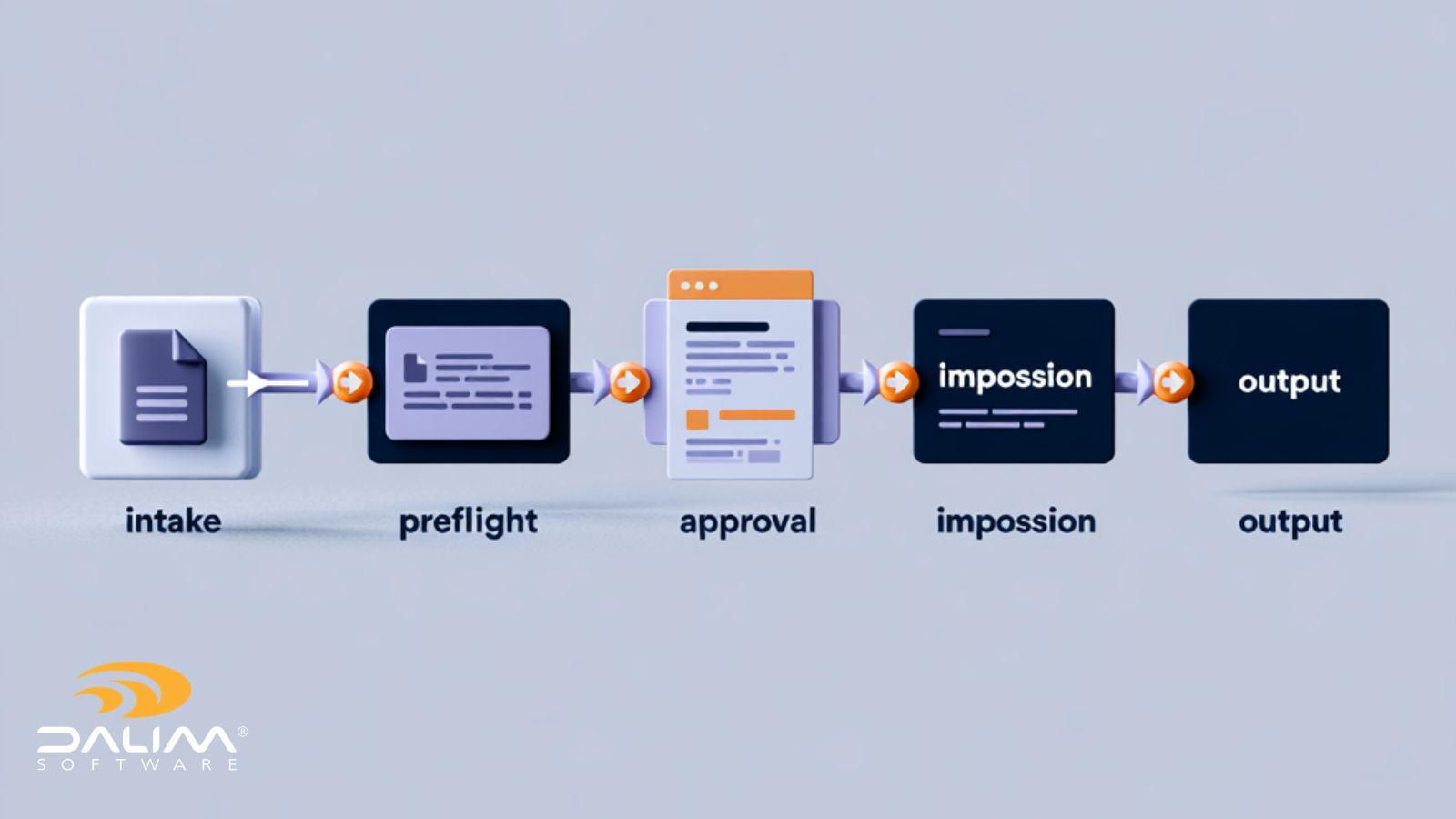
The first thing any production system needs to do with an incoming file is check whether it meets your production requirements. Preflight automation does this at speed and at scale - checking for issues like missing fonts, incorrect color modes, low-resolution images, PDF standard compliance, and bleed settings.

Where issues are minor and correctable, an automated system can fix them without any human involvement. Where problems are more complex, the file is flagged and routed for manual review. The result is that operators spend time solving genuine problems, not processing files that could be handled automatically.

Color Management

Consistent color across print runs, across substations, and across different output devices is one of the harder challenges in production. Automated color management applies the right profiles, conversions, and corrections based on defined rules - removing the inconsistency that comes from operators making individual judgments job by job.

Imposition

Imposition - the arrangement of pages on a press sheet to minimize waste and meet finishing requirements - has traditionally required significant manual effort. Template-based approaches work for straightforward, repeatable jobs, but break down quickly when job specifications vary.

Rule-driven imposition automation generates layouts dynamically based on live job data: page size, quantity, press configuration, substrate, and finishing requirements. This removes the need to maintain large libraries of static templates and eliminates a significant source of prepress error.

File Transformation and Normalization

Files arrive in different formats, from different sources, built to different standards. Normalization automation converts incoming files to a consistent format that meets your production specifications - removing the manual steps that would otherwise be required to prepare each file for downstream processing.

Routing and Job Management

Once a file has been validated and processed, it needs to move through the right production steps in the right order. Workflow routing automation handles this - triggering the next step based on defined rules, notifying the right people when their input is needed, and keeping jobs moving without manual handoffs.

Online Proofing and Approval

Approvals are where prepress workflows often stall. Files wait in inboxes. Feedback arrives in multiple formats. Version control breaks down. Automated approval workflows route files to the right stakeholders, collect feedback in a structured way, and maintain a clear audit trail of every review decision.

2

Manual vs. Automated Prepress: What Changes


  Manual prepress Automated prepress
File checking Operator reviews each file individually Automated preflight applied to every file at intake
Error correction Manual fixes, job by job Common errors corrected automatically; complex issues flagged
Imposition Template-based, manually managed Rule-driven, generated from live job data
Job routing Manual handoffs between teams Automated routing based on defined rules
Approvals Email chains, fragmented feedback Structured approval workflows with full audit trail
Scalability Limited by operator capacity Scales with volume, including seasonal peaks
Consistency Varies by operator Uniform standards applied across every job


Why Prepress Teams Are Under More Pressure Than Ever

The business case for prepress automation has become harder to argue against in recent years, for a few converging reasons.

Volume has increased. The growth of digital print, web-to-print, and short-run packaging means most production environments are handling more jobs, more frequently, with more variation in specifications than they were a decade ago.

Turnaround expectations have shortened. Customers who once accepted several days of production lead time now expect same-day or next-day output for many job types. There is less slack in the schedule to absorb manual processing time.

Skilled operators are harder to find and retain. Experienced prepress operators represent a significant operational dependency. When production processes are heavily manual, that dependency becomes a risk - particularly during seasonal peaks when volume spikes and staffing constraints are most acute.

The cost of errors has risen. Reprints, wasted substrate, missed SLAs, and the time spent reworking jobs that should have been right first time are all quantifiable costs. Automation does not eliminate errors entirely, but it catches far more of them earlier in the process, when they are cheaper to fix.

A Practical Framework for Prepress Automation

If you are evaluating where automation could have the most impact in your production environment, a structured approach tends to work better than trying to automate everything at once.

  1. Map your current workflow end to end. Identify every step between file receipt and press-ready output. Note where manual effort is concentrated, where errors most commonly occur, and where jobs most frequently stall.
  2. Identify your highest-cost manual processes. Not all manual steps carry the same cost. Prioritize automation where errors are most expensive, where volume is highest, or where operator time is most constrained.
  3. Start with preflight and file intake. Automated preflight at the point of intake delivers immediate, measurable value in almost every production environment. It is also a relatively contained starting point that does not require restructuring your entire workflow.
  4. Layer in routing and job management. Once file validation is automated, the next step is ensuring jobs move through the workflow without manual intervention. Define your routing rules clearly before implementing automation - the quality of your rules determines the quality of your outcomes.
  5. Automate imposition and transformation for your highest-volume job types. Start with the job types that run most frequently and have the most consistent specifications. Expand from there as confidence in the system grows.
  6. Integrate your approval workflows. Structured online proofing is often where the largest time savings are found, particularly for teams managing complex multi-stakeholder approvals. Connecting approval workflows to your production system closes the loop between review decisions and downstream processing.
  7. Measure, refine, and expand. Automation is not a set-and-forget process. Track error rates, throughput, and cycle times before and after implementation. Use that data to identify where further automation would add value.

Technology and Integration: What to Look For

The effectiveness of prepress automation depends significantly on the platform you use to implement it. A few considerations are worth keeping in mind when evaluating options.

Integration with existing systems. Production environments typically include a mix of MIS, DAM, ERP, and output systems. A prepress automation platform that sits in a silo - requiring manual data entry to communicate with other systems - reintroduces exactly the kind of inefficiency automation is supposed to eliminate. Native connectors and open APIs matter.

Flexibility for complex jobs. Standard automation handles straightforward, repeatable work well. The real test is how a system handles exceptions, edge cases, and complex multi-stage jobs with conditional routing logic. Production environments that deal with varied job types need a platform that can accommodate that variation.

Audit trails and compliance support. For packaging and regulated industries in particular, the ability to document the full history of every job - who reviewed it, when, what changed, and what was approved - is not optional. It is a production and compliance requirement.

Scalability. Volume is not constant. Seasonal peaks, new contract wins, and business growth all create spikes in production demand. A platform that requires proportional increases in staffing to handle volume increases defeats part of the purpose of automation.

Platforms built for enterprise print and packaging environments handle these requirements as core capabilities rather than add-ons. DALIM FUSION, for example, supports workflows that range from fully automated sequences with no stakeholder involvement to complex multi-step automations embedded within larger project management stages - so a single project task like "Prepress Prep" can trigger dozens of behind-the-scenes steps including routing, file checks, conversions, and approvals without manual intervention.

Prepress Automation in Packaging and Regulated Industries

Packaging production places particular demands on prepress workflows. Jobs involve multiple substrates, complex finishing specifications, regulatory content requirements, and often multi-market variants with different language versions and compliance markings.

Manual management of this complexity creates significant risk. Errors that reach plate or press in a packaging environment can mean scrapped materials, production delays, and in regulated categories like food, pharmaceutical, and personal care, potential compliance failures.

Prepress teams in these environments are typically managing color profile validation, font correction, image resolution checks, PDF standard compliance, complex imposition and pagination, and multi-stakeholder approval coordination - often simultaneously, under tight deadlines. Automation does not remove the need for skilled judgment entirely, but it removes the manual overhead that consumes operator time on repeatable, rule-based tasks.

1

Common Mistakes to Avoid

Automating a broken process. Automation amplifies what is already there. If your current workflow has structural problems - unclear ownership, poorly defined specs, inconsistent file submissions - automating it will surface those problems faster and at higher volume. Understand your workflow thoroughly before you automate it.

Underestimating the importance of rules quality. Automated routing, preflight, and imposition all depend on well-defined rules. Vague or incomplete rules produce inconsistent outcomes. Invest time in defining your production standards clearly before implementation.

Treating automation as an all-or-nothing project. The most successful automation implementations tend to be incremental. Start where the impact is highest, build confidence, and expand from there.

Neglecting the approval workflow. File processing automation is often where teams focus first, but approval delays frequently account for more lost production time than file errors. An incomplete automation strategy that leaves approvals manual will leave significant time savings on the table.

Conclusion

Prepress workflow automation is not a new concept, but the case for it has become substantially more compelling as production volumes, speed expectations, and complexity have all increased.

The core value is straightforward: automate the repeatable, rule-based work so that skilled operators can focus on the decisions and exceptions that genuinely require human judgment. The result is faster throughput, more consistent output, lower error rates, and a production operation that can scale without proportionally scaling its headcount.

For teams still relying heavily on manual prepress processes, the question is less whether to automate, and more where to start.

If you want to understand what prepress automation could look like in your specific production environment, talk to the DALIM team.

Frequently Asked Questions

What is prepress workflow automation? Prepress workflow automation is the use of software to automate the tasks involved in preparing files for print production. This includes preflight checking, error correction, color management, file normalization, imposition, job routing, and approval workflows. The goal is to move files from intake to press-ready output with minimal manual intervention, applying consistent standards across every job.

What does prepress automation include? Prepress automation typically covers preflight and file validation, automated error correction, color profile management, imposition, file transformation and normalization, job routing, and online proofing and approval workflows. Enterprise platforms integrate all of these functions within a single connected environment.

Why is prepress automation important in 2026? Production volumes have increased, turnaround expectations have shortened, and the cost of prepress errors has risen. At the same time, experienced operators are harder to retain and seasonal volume peaks create staffing pressure. Automation addresses all of these challenges by handling repeatable, rule-based tasks at scale, without relying on manual effort at every step.

What is preflight in prepress? Preflight is the process of checking a digital file against production specifications before it goes to press. This includes validating color modes, image resolution, bleed settings, font embedding, PDF standard compliance, and other parameters. Automated preflight applies these checks to every file at intake, flagging errors and - where possible - correcting them automatically.

How does prepress automation help with imposition? Rule-driven imposition automation generates press sheet layouts dynamically using live job data - page size, quantity, press configuration, substrate, and finishing requirements. This removes the need to manually manage large libraries of static templates and eliminates a common source of prepress errors, particularly for jobs with variable specifications.

What is the difference between manual and automated prepress? Manual prepress relies on operators to check, correct, and route each job individually. Automated prepress applies defined rules consistently across every job, handling routine tasks without human input and routing exceptions to operators only when genuinely needed. The practical differences are speed, consistency, scalability, and error rates - all of which favor automation, particularly at volume.

How does prepress automation support compliance in regulated industries? In packaging and regulated industries, prepress automation supports compliance through automated content validation, structured approval workflows, and complete audit trails. Every review decision, version change, and approval action is logged, creating a documented record that meets quality management and regulatory requirements.

How long does it take to implement prepress workflow automation? Implementation timelines vary depending on the complexity of your existing workflows and the platform chosen. A phased approach - starting with preflight and file intake, then adding routing, imposition, and approval workflows - typically delivers faster time to value than attempting to automate everything simultaneously.