
1 min read
Ask any production manager how a job actually moves through their shop, from the moment a file lands to the moment it hits press or ships to a customer, and you'll usually get a pause before the answer. That pause is the tell. In most print, packaging, and prepress operations, the real workflow lives in people's heads, in a patchwork of email threads, shared drives, spreadsheets, and the institutional memory of whoever has been there the longest.
That approach worked when volumes were lower and turnaround expectations were more forgiving. It doesn't work as well now. Clients want faster turns, jobs are more complex (more SKUs, more markets, more file formats), and the skilled staff who used to carry undocumented processes in their heads are retiring faster than they're being replaced. Manual, person-dependent workflows are becoming the biggest constraint on how much work a production team can actually take on.
Our article today looks at what it actually means to move from manual, ad hoc production steps to an automated pipeline: what triggers the need for a change, what a modern print workflow platform does differently, a practical framework for making the transition, and the governance and technology considerations that determine whether an automation project succeeds or just adds complexity.
What Is Print Workflow Automation?
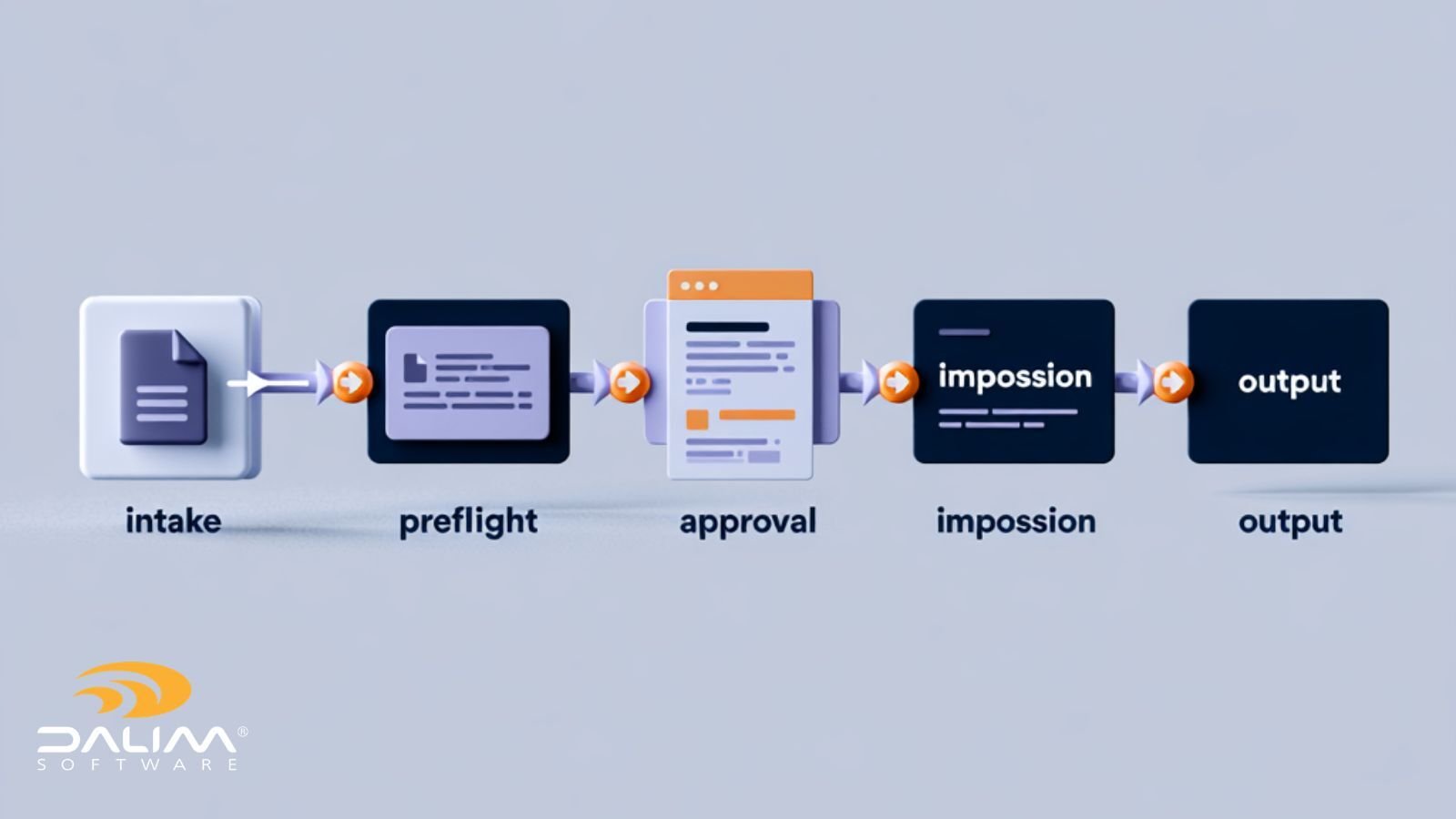
Print workflow automation is the use of software to manage and execute the steps a print, packaging, or publishing job goes through, including file intake, preflight, approvals, color and layout preparation, and delivery, without relying on manual handoffs. Rules, metadata, and file conditions trigger each step automatically, reducing delays and human error.
Key Takeaways
- Manual print workflows depend on individual knowledge, which makes them slow, inconsistent, and hard to scale.
- Automated pipelines use metadata, file conditions, and business rules to move jobs through production stages without waiting on a person to notice and act.
- The most effective automation projects start with one bottleneck stage, not a full rip-and-replace of every process at once.
- Preflight, imposition, approvals, and asset management are the stages that benefit most from automation because they're repetitive, rules-based, and error-prone when done by hand.
- Governance (audit trails, permissions, version control) has to be built into the automation, not bolted on afterward, especially in regulated or brand-sensitive industries.
- Automation doesn't remove people from the process. It removes people from the parts of the process that don't need judgment, so they can spend time on the parts that do.

Why Manual Print Workflows Break Down
Manual workflows rarely fail all at once. They degrade gradually, and by the time the strain is obvious, it's already showing up in the numbers that matter.
Turnaround slows down as volume grows. A process that works fine at 20 jobs a week starts to buckle at 100, not because any single step got harder, but because the number of handoffs, approvals, and status checks multiplies. Each handoff is a place where a job can sit waiting for someone to notice it's ready for the next stage.
Errors compound at the handoff points. Wrong file version sent for print, a proof approved on an outdated file, a spot color missed because the person checking wasn't the one who set up the job originally. These aren't skill problems. They're the predictable result of moving work between people and systems that aren't talking to each other.
Institutional knowledge walks out the door. When one experienced operator knows which packaging jobs need extra scrutiny for a specific retailer's spec sheet, that knowledge disappears the day they leave or take vacation. A rules-based workflow captures that knowledge in the system instead of in a person.
Scaling requires proportional headcount. If doubling job volume means doubling staff, automation isn't really happening, no matter how much software is in use. True automation should let volume grow faster than headcount does.
Compliance and traceability get harder to prove. In regulated sectors like pharma, food, and consumer packaged goods, being able to show exactly who approved what version of a file, and when, isn't optional. Manual processes make that traceability dependent on someone remembering to save an email or screenshot.
What an Automated Print Production Pipeline Actually Looks Like
The shift from manual to automated isn't about removing people from decisions. It's about removing people from the parts of the job that don't need a decision at all.
In a modern setup, a file upload, a metadata change, or a status update inside a project can trigger a defined sequence: automatic file checks, format conversions, color and trapping adjustments, routing to the right reviewer, and notifications when action is needed. None of that requires someone to notice the file has arrived and manually kick off the next step.
This is the core idea behind workflow automation in DALIM FUSION: workflows can run as fully automated sequences with no human involvement at all, or as multi-step sequences embedded inside a single project stage, so one task like "prepare for print" can quietly trigger dozens of background steps including routing, file checks, conversions, and approvals. The platform is built around a large library of automation building blocks that teams can combine into workflows for print, packaging, digital asset management, and approval processes, using metadata, file conditions, or business rules to decide which path a job takes.
The same logic extends into specific production stages:
- File checking and transformation. Instead of a person manually running preflight on every incoming file, rules-based checks catch issues like incorrect color profiles, missing fonts, or resolution problems automatically, and can trigger corrections or route the file back before it ever reaches a press operator.
- Imposition. Laying out pages or SKUs for press is one of the most time-consuming manual tasks in a print shop. Automated imposition applies dynamic, template-free layouts that adjust automatically to job specifications, which matters most in short-run and high-SKU packaging environments where every job is slightly different.
- Review and approval. Automated routing sends the right proof to the right stakeholder at the right stage, with version comparison and annotation built in, instead of relying on someone to remember who needs to sign off next.
- Asset management. A work-in-progress digital asset management system keeps every master file, version, and rendition governed and traceable, and can trigger downstream workflows automatically whenever a version updates or a status changes, rather than requiring someone to manually notify the next team.
A Practical Framework for Moving From Manual to Automated
Teams that make this transition successfully tend to follow a similar path. Trying to automate everything at once is usually where projects stall.
- Map the current process as it actually runs, not as it's documented. Talk to the people doing the work day to day. The gap between the official process and the real one is usually where the automation opportunity lives.
- Identify the single biggest bottleneck stage. This is often preflight, proof routing, or file handoffs between prepress and production. Pick the stage causing the most delay or the most rework, not the one that's easiest to automate.
- Define the rules before choosing the tooling. What conditions should trigger a given path? What counts as an exception that still needs a person? Writing this down clarifies what the software actually needs to do.
- Automate that one stage and measure the result. Track turnaround time, error rate, and rework before and after. A visible win builds the case for expanding automation further.
- Layer in adjacent stages. Once one stage is automated, connect it to the next one, so a completed file check can automatically trigger routing to approval, and an approval can automatically trigger imposition or delivery.
- Build in governance from the start. Permissions, audit trails, and version history need to be part of the workflow design, not an afterthought added after an audit finding.
- Review and adjust quarterly. Job types change, retailers update specs, and new regulations appear. A workflow that isn't reviewed periodically will quietly drift out of date.

Manual vs. Automated: Where the Difference Actually Shows Up
| Stage | Manual Approach | Automated Approach |
|---|---|---|
| File intake | Someone checks a folder or inbox and manually starts preflight | Upload or metadata event automatically triggers file checks |
| Preflight | Operator manually reviews each file against a checklist | Rules-based checks flag or auto-correct issues before they reach production |
| Approvals | Proofs emailed or shared, chased manually for sign-off | Automated routing to the right reviewer, with reminders and escalation |
| Imposition | Layout built manually per job spec | Dynamic, rules-driven layout generated automatically |
| Version control | Tracked informally through file names and folders | Centralized versioning with full audit history |
| Scaling volume | Requires proportional increase in staff | Additional volume processed within existing workflow capacity |
Common Mistakes When Moving to Automation
Trying to automate everything in one project. This almost always leads to a long implementation, a frustrated team, and a system that gets abandoned halfway through. Start narrow.
Treating automation as a pure IT project. The people who actually run production jobs every day know where the real bottlenecks are. Leaving them out of the design process produces a system that's technically impressive and practically unhelpful.
Ignoring exceptions. Every workflow has edge cases: a rush job, a client with a nonstandard spec, a file that fails preflight for a legitimate reason. A good automated workflow has a clear, fast path for a human to step in when a rule doesn't fit, rather than forcing every exception through the same rigid sequence.
Skipping the audit trail. In packaging, pharma, and other regulated categories, being unable to show who approved a specific file version at a specific time isn't a minor gap. It's a compliance risk.
Governance and Compliance Considerations
Automation should make compliance easier to demonstrate, not harder. That means every automated step, whether it's a file check, a color adjustment, or an approval, should leave a record of what happened, when, and under whose authority. For teams in regulated packaging categories such as pharma, food, and consumer goods, this traceability often matters as much as the speed gains automation provides. It's worth treating audit trails, permission structures, and version history as core requirements of the workflow design, not features to check off after the fact.
Where to Start
Moving from manual to automated production isn't about replacing your team. It's about giving them a system that catches the routine errors, remembers the rules nobody has time to re-explain every time, and frees up experienced staff to handle the judgment calls that actually need a human. Start with the one stage causing the most pain, prove the value, and build outward from there. For teams in prepress and print production especially, the operations that make this shift early tend to be the ones absorbing volume growth without a proportional increase in headcount or errors.
If you're mapping out where automation would make the biggest difference in your own production process, talk to DALIM about how a workflow assessment might look for your team.
FAQ
What is the difference between print workflow automation and a DAM system? Workflow automation focuses on moving a job through defined production steps, such as file checks, approvals, and routing, automatically. A digital asset management (DAM) system focuses on storing, versioning, and governing the files themselves. Modern platforms combine both, so a change in the DAM (like a new file version) can trigger a workflow automatically.
Do we need to replace our entire process to benefit from automation? No. The most successful transitions start with a single bottleneck stage, such as preflight or proof routing, prove the value there, and expand from that point. A full rip-and-replace approach is more likely to stall than a phased one.
How does workflow automation help with compliance in regulated industries? Automated workflows can build audit trails, permission controls, and version history directly into each step, so there's a clear record of who approved what, and when. This is far more reliable than depending on manual documentation like saved emails or screenshots.
Can automated workflows still handle rush jobs or exceptions? Yes, when designed correctly. A well-built workflow includes clear paths for exceptions to route to a human quickly, rather than forcing every unusual job through the same rigid automated sequence.
What production stages benefit most from automation? Preflight and file checking, imposition, proof routing and approvals, and asset version control tend to see the biggest gains, since these stages are repetitive, rules-based, and prone to error when handled manually at volume.
How long does it typically take to see results from workflow automation? Teams that automate a single, well-chosen bottleneck stage often see measurable improvements in turnaround time and error rates within weeks, since the change is contained and easy to track against a clear baseline.
Does automation reduce the need for skilled production staff? Not typically. It reduces the time skilled staff spend on repetitive, rules-based tasks, which frees them to focus on complex jobs, exceptions, and quality decisions that genuinely need expert judgment.
What's the biggest risk in a workflow automation project? Trying to automate too much at once, without input from the people running the process day to day. Projects that skip this step tend to produce systems that look sophisticated but don't match how work actually happens on the floor.
1 min read
What Is Prepress Workflow Automation? (2026 Guide)
If you work in print or packaging production, the gap between receiving a file and sending it to press has always been where things go wrong. Fonts...
1 min read
How Retail Brands Are Streamlining Digital Prepress
If you work in marketing or operations at a retail brand, you probably don't spend much time thinking about prepress. That's understandable. It's not...

Rebecca Freeman